Baucore Inbox
From inbox to quote-ready, with the evidence behind every line.
Baucore Inbox reads incoming project emails and their attachments, matches them to the right Account, Contact, and Project, follows the thread as it evolves, matches each line to your Salesforce products, and stages a fully sourced quote, so no rep re-types it into Salesforce.
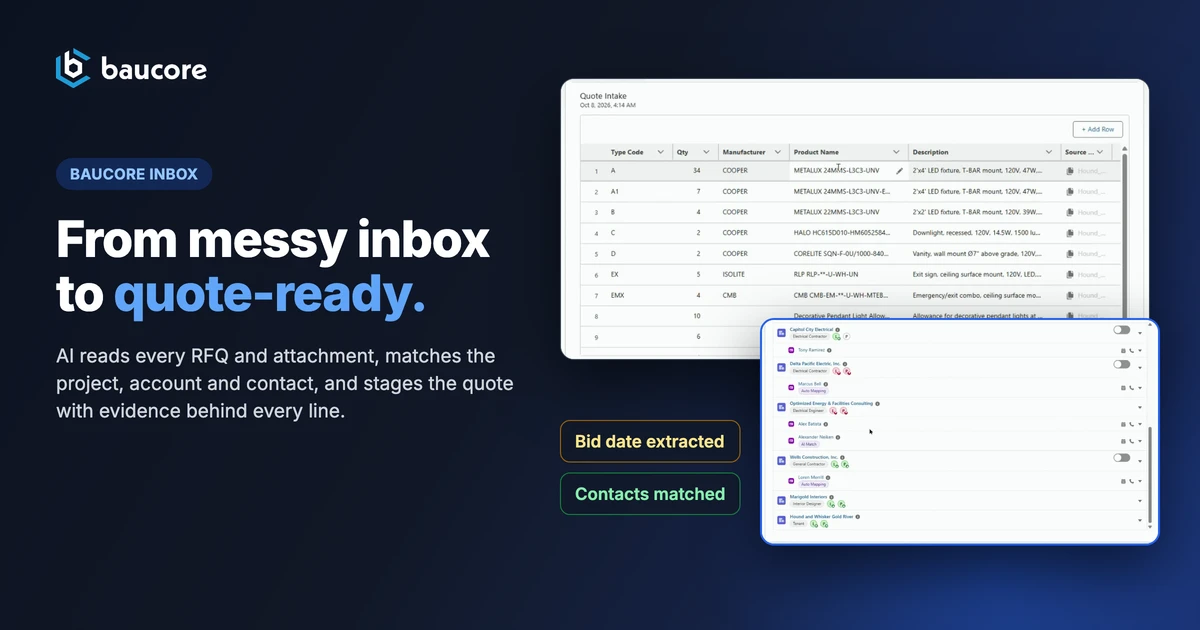
Before Baucore Inbox
Turn email into work. An RFQ arrives with a scope buried in an attached PDF, and a rep re-types the project, the contact, and every line item by hand.
WITH BAUCORE INBOX
Baucore Inbox reads the email and its attachments, creates or updates the right Account, Contact, and Project, keeps every reply on the same project and the same quote instead of forking a new record, and stages a quote where every line item is matched to a product in your Salesforce price book and linked to the page and screenshot it came from.
From email to matched records and, today, a staged quote.
An email arrives, attachments and linked files included. Baucore Inbox extracts what's in it, matches the account, contact, and project against existing records, updating them or creating new ones, and reads intent. A quote request is staged as a Quote Intake, with each line matched to a Salesforce product and backed by page-level evidence today; more intents are on the roadmap.
Every matching rule and intent workflow runs natively in Salesforce, so your admin team can configure or extend it without waiting on a product release.
What Baucore Inbox Does
Two Inbound Channels
A dedicated Inbox email address or the Outlook add-in. Mail arrives from wherever your team already works.
Reads the Message and Every Attachment
Extraction runs on the email and every attached spec sheet, takeoff, bill of materials (BOM), or PDF, because in building materials the scope usually sits in the attachment. Files shared by link on Dropbox, OneDrive, and similar providers are pulled in the same way.
Opens Drawings Automatically
Attached drawing sheets open automatically, and Baucore Inbox reads the title block for the architect, engineer, other key contacts, and the legal project name, so it captures participants even when a drawing set is the only file attached.
Auto-Match or Create, Across Four Object Types
Matches or creates Account, Contact, Lead, and Project records, including every stakeholder on the distribution list and the sender. One forwarded email can resolve six companies and contacts, with roles inferred: project manager, architect, specialist engineer, engineer, owner.
Thread-Aware Updates
One project, one record, however many replies it takes. Built on the Inquiry object, Baucore Inbox recognizes a new message on a thread it has already seen and updates the existing project and quote instead of creating a duplicate.
Intent-to-Flow Automation
RFQ, order update, or shipping notification: Inbox reads the intent and routes the message to the matching flow.
Matches Quote Lines to Your Salesforce Products
Pick a price book and Baucore Inbox matches each extracted line to an existing Salesforce product record with one click on "Match All Products". Every match carries a confidence score, with the source file and page beside it. Review, swap, or remove a match before anything becomes a quote.
Evidence Capture
Every line in the Quote Intake is traceable to the exact file and page it came from, with a screenshot attached. When two documents cover the same scope, Baucore Inbox cross-references them and explains its reasoning in plain language, for example "these two documents agree, here's the page, and here's what I couldn't find."
Incoming mail covers more than new RFQs
A fresh quote request. A revision to one already in flight. The same project, asked by a second distributor. "Where is my order?" A damage report. They land in the same inbox, and each is different work.
Baucore Inbox reads the intent of each message and hands it to the workflow mapped to it. The intents are yours to define and the flows are yours to build. Both live in Salesforce, where your admin changes them without waiting on a product release.
It reads the message, its attachments, and the files shared by link on Dropbox, OneDrive or Google Drive, downloaded automatically. It proposes the intent, the project, the participants and the extracted scope, each traceable to the page it came from. You decide. The mapped workflow starts when you start it.
One project, many requesters
On a live project the same scope comes back more than once. A second distributor bids the job. A contractor asks for pricing against the same fixture schedule. If each email stands alone, you get separate projects, separate quotes, and separate versions of the truth.
AI Project Match compares each incoming request against the projects you already have and ranks the candidates by fit, showing what the score is based on. Once someone confirms the match, the request joins the project it belongs to as its own inquiry. One project record, however many people ask about it.
HOW IT WORKS
Email arrives through a dedicated Inbox address or the Outlook add-in, attachments included.
AI reads and matches: it extracts sender, participants, project, and intent from the message and its attachments, then matches them against existing records or creates new ones.
Record created, or updated on a reply: a new thread creates a new Project; a reply on a known thread updates the same Project and the same Quote Intake instead of duplicating it.
Quote staged, with evidence: every extracted line item cites its source file and page with a captured screenshot, and Inbox matches it to a product in your Salesforce price book, ready for review.
Watch the recording
View all events
Five messy emails. One quote-ready project.
Watch Baucore Inbox read a shared quotes inbox, resolve every email to the right project, and stage the quote for human review.
Inbox chaos · Five emails, five different subject lines, one project.
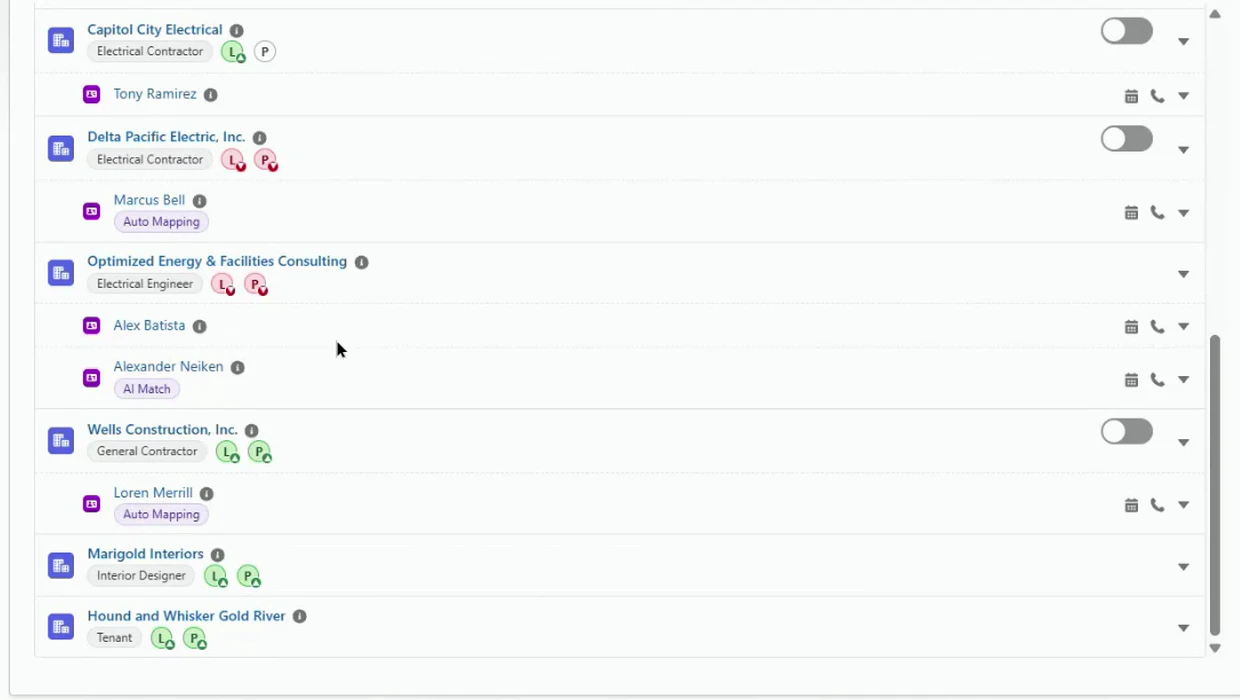
One forwarded email thread, every company and contact matched or created: electrical contractors, engineer, general contractor, interior designer, and tenant, each identified and linked to the project.
A real Quote Intake
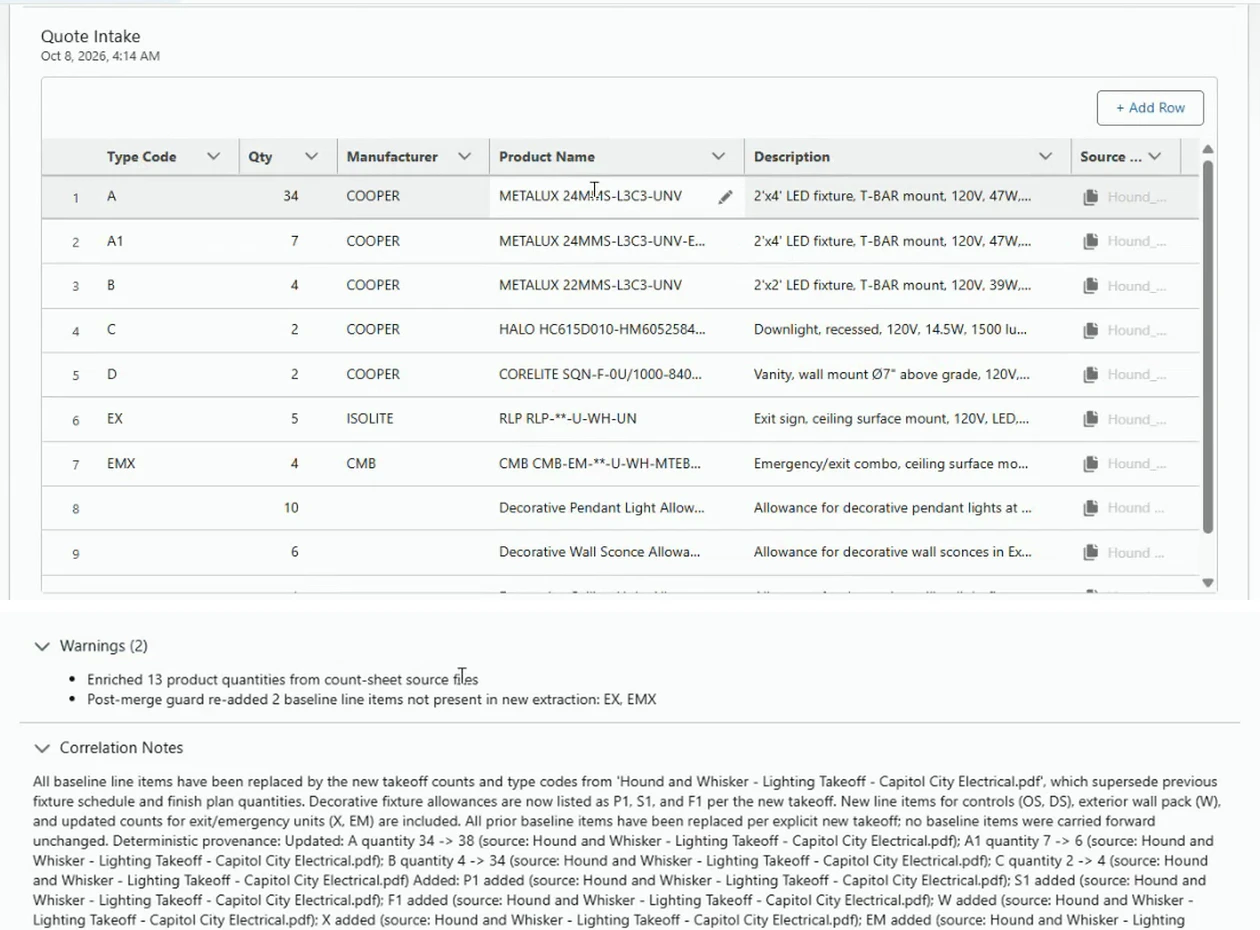
This is a real Quote Intake, mid-thread. A reply changed quantities and added line items. Baucore Inbox updated the intake, kept the prior extraction under Historical Data, and explained what changed and why.
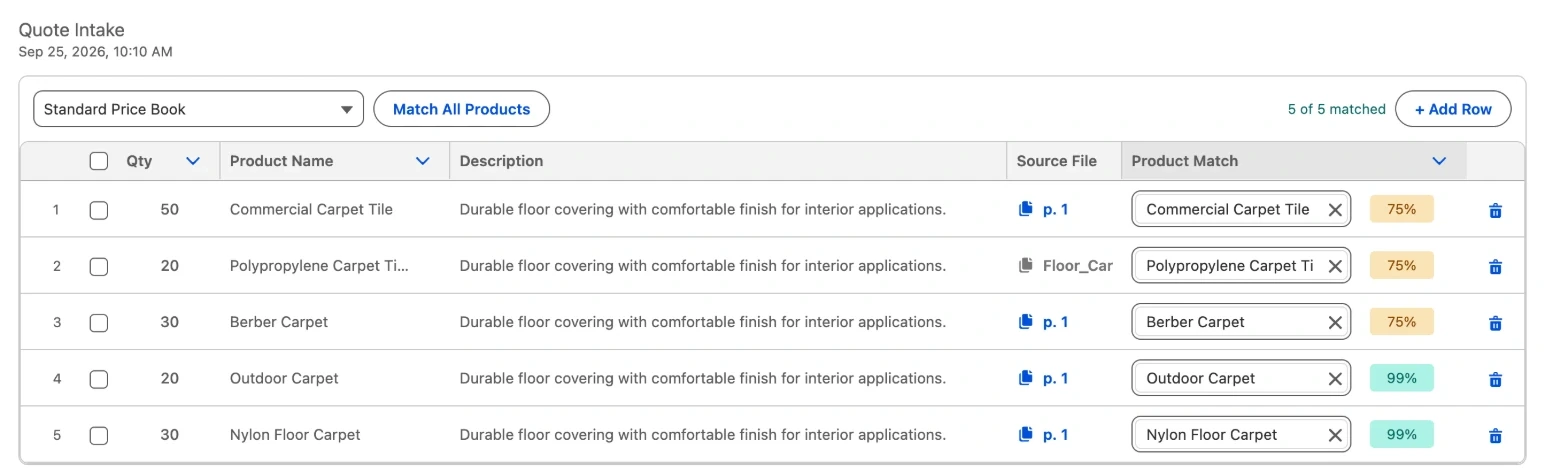
Product matching is optional. Pick a price book and Baucore Inbox matches every extracted line to an existing Salesforce product, with a confidence score per line and the source file and page beside it. Review or swap any match before the quote is created. Without a price book, the Quote Intake works as in the first view.
Built natively on the platform you already trust

ROI calculator
What is your agency’s inbox really costing you?
Every RFQ, spec sheet and lighting schedule that lands in your inbox is typed, filed, researched and chased by hand. Enter your volumes and your team’s burdened rates to see what Baucore Inbox gives back.
1. Your agency
Start from a typical profile, then tune every number to match reality.
RFQs, spec updates, addenda, submittals, replies
Distinct jobs entering your pipeline
Requests that need a takeoff or schedule review
Fixtures, drivers, controls, accessories
Include revisions and re-quotes
Plans, specs, schedules, addenda, cut sheets
Architect, engineer, GC, EC, distributor, owner
2. Your team & fully burdened rates
Headcount and hourly cost per role (salary + benefits + overhead). Set headcount to 0 for roles you don’t have — time is re-allocated to the roles that remain.
| Role | Headcount | Burdened $/hr |
|---|---|---|
| Principal / OwnerReviews big bids, relationships, approvals | ||
| VP Sales / Sales ManagerPipeline, forecasting, rep coaching | ||
| Operations LeaderProcess, systems, order flow | ||
| Quotations ManagerOwns quote queue and turnaround | ||
| Quoter / EstimatorTakeoffs, pricing, quote build | ||
| Inside Sales / ApplicationsInbound requests, product support | ||
| A&D Rep (Specifier)Architects, designers, engineers | ||
| Contractor / Distributor RepElectrical contractors, distributors | ||
| Controls Technician / SpecialistControls scope, schedules, startup | ||
| Sales Admin / CoordinatorFiling, order entry, follow-up |
3. What Baucore Inbox automates
Eleven manual steps between “email arrives” and “quote goes out”. Adjust minutes per task to match how your team works, or switch a step off.
| Include | Task | Units / mo | Manual min | With Baucore min | Hrs saved / yr | $ saved / yr |
|---|---|---|---|---|---|---|
| Inbox triage & intent sorting CoreRead, classify (RFQ, addendum, info request, meeting) and route each email | 1,200 | 378 | $25,893 | |||
| Project & lead intake CoreCreate the project record: name, address, bid date, scope, source | 120 | 144 | $9,007 | |||
| Name & participant extraction CorePull architect, engineer, GC, EC, distributor and contacts; assign roles | 720 | 146 | $8,034 | |||
| Project match & duplicate check CoreIs this a new job or another email on a known one? Link, don't duplicate | 120 | 63 | $3,736 | |||
| Acknowledgements & clarifying replies CoreConfirm receipt, ask for missing plans/schedules, set expectations | 90 | 34 | $1,934 | |||
| Next-step planning & task creation CoreDecide who does what by when: follow-ups, tasks, flows launched from intent | 120 | 90 | $8,195 | |||
| Quote assembly (Inquiry-to-Quote) CoreBuild the quote from captured scope: cross-reference, price, format, send | 140 | 357 | $22,848 | |||
| Download, name & file documents ExtendedSave plans, specs, addenda to the right place with a consistent name | 960 | 202 | $10,765 | |||
| Create project file folders ExtendedStandard folder structure per job so nothing is lost at handoff | 120 | 50 | $2,454 | |||
| Capture lighting schedule snapshots ExtendedFind the fixture/controls schedule in the plan set and clip it for takeoff | 90 | 95 | $6,228 | |||
| Line-item & quantity entry ExtendedKey fixture types, quantities and accessories from schedules and BOMs | 5,400 | 486 | $30,229 | |||
| Project web research ExtendedOwner, GC, bid date, spec status, competing lines, who's involved | 120 | 216 | $17,939 |
Advanced: realization & investment
Used for FTE-equivalent
Optional. Add if comparing the full Baucore subscription
Where the time comes back
Annual hours saved by task
Who gets their week back
Annual savings by role, and hours returned per person each week
| Role | Hrs saved / yr | Hrs / person / wk | $ saved / yr |
|---|---|---|---|
| Principal / Owner | 76 | 0.8 | $11,340 |
| VP Sales / Sales Manager | 54 | 1.1 | $6,750 |
| Operations Leader | 23 | 0.5 | $2,223 |
| Quotations Manager | 337 | 7.0 | $26,972 |
| Quoter / Estimator | 676 | 4.7 | $39,222 |
| Inside Sales / Applications | 479 | 5.0 | $24,887 |
| A&D Rep (Specifier) | 126 | 0.9 | $10,687 |
| Contractor / Distributor Rep | 42 | 0.3 | $3,173 |
| Controls Technician / Specialist | 148 | 3.1 | $10,632 |
| Sales Admin / Coordinator | 299 | 6.2 | $11,376 |
| Total | 2,260 | $147,262 |
Return on investment
Baucore Inbox credits sized to 1,200 emails/month at 50 credits per email (60,000 credits/month).
$17,250
annual investment (Inbox credits)
$130,012
net annual benefit
754%
return on investment
1.4 mo
payback period
Lowest-cost plan: Tier 2 plus 3 top-up packs per year (top-ups never expire). Prices exclude VAT.
Optional upside: faster quotes win more
Not included in the headline number. Replying and quoting faster typically lifts win rate.
e.g. 22% to 23% = 1.0
+17
additional wins / year
$21,000
additional commission / year
The Benefits
Reps keep working in email. Baucore Inbox does the data entry.